An RSS Reader for E-ink screens
As you get older, long sessions in front of your computer screen can leave your eyes strained. Especially in the evenings I often find it hard to read longer texts on my laptop or phone. So I was thinking about an easy way to read the most important articles of the day with the browser of my Tolino E-Reader which would make for an optimal viewing experience. My go-to site for essential design/dev-related stuff is sidebar.io, so its RSS feed should be the basis for a little application that lets me open its linked articles in a E-ink optimized way. Thankfully, in the age of AI it’s really easy to kick off projects like this.
My goals
- a mix of RSS reader and read-later app that lets you open URLs in a stripped-down reader view
- a simple UI, optimized for the screen size and input capabilities of a small E-Reader like the Tolino Shine
- a lightweight frontend based on Astro that will easily work in its (experimental) browser
- free hosting on a service like Netlify
Existing tools
I started to do some research on existing tools with a comparable functionality. Of course, this is a very niche area. I only found a handful of services offering an optimized RSS reading experience on E-ink devices. One is Reabble. It’s basically a specialized frontend for Inoreader, a fully-featured RSS reader where you can do all the administration-related stuff. It’s basically exactly what I want, but maybe already a bit too much than I need. The other is QiReader - a web-based RSS reader with an E-ink optimized theme. reink.app uses Omnivore as a backend. However, their cloud solution is no longer available and self-hosting is too complicated in this case.
I also looked at general read-later tools. Instapaper would be an ideal candidate functionality-wise. They already support ‘send to Kindle’ and plan to further optimize their frontend for E-ink; Kobo Readers are also already officially supported. Theoretically it could be the backend to my simple reader. The same goes for Raindrop, the service I use for bookmarking stuff. However, I didn’t want to deal with APIs for now so I ditched the idea of a separate backend.
Building the thing
I started by asking ChatGPT for advice. I collected general information — CSS recommendations, technical architecture etc. Since I knew that I wanted to use Astro as the site’s framework I then went into this topic specifically. Also, Gemini 3 was just released and I wanted to give it a try. It turned out it was far more capable of producing working and apparently clean code. I had a first prototype running within minutes and the overall architecture it helped me to create seemed convincing. It also helped me to solve issues related to Netlify’s build process which, of course, has some limitations compared to your local environment.
The UI and logic of the reader
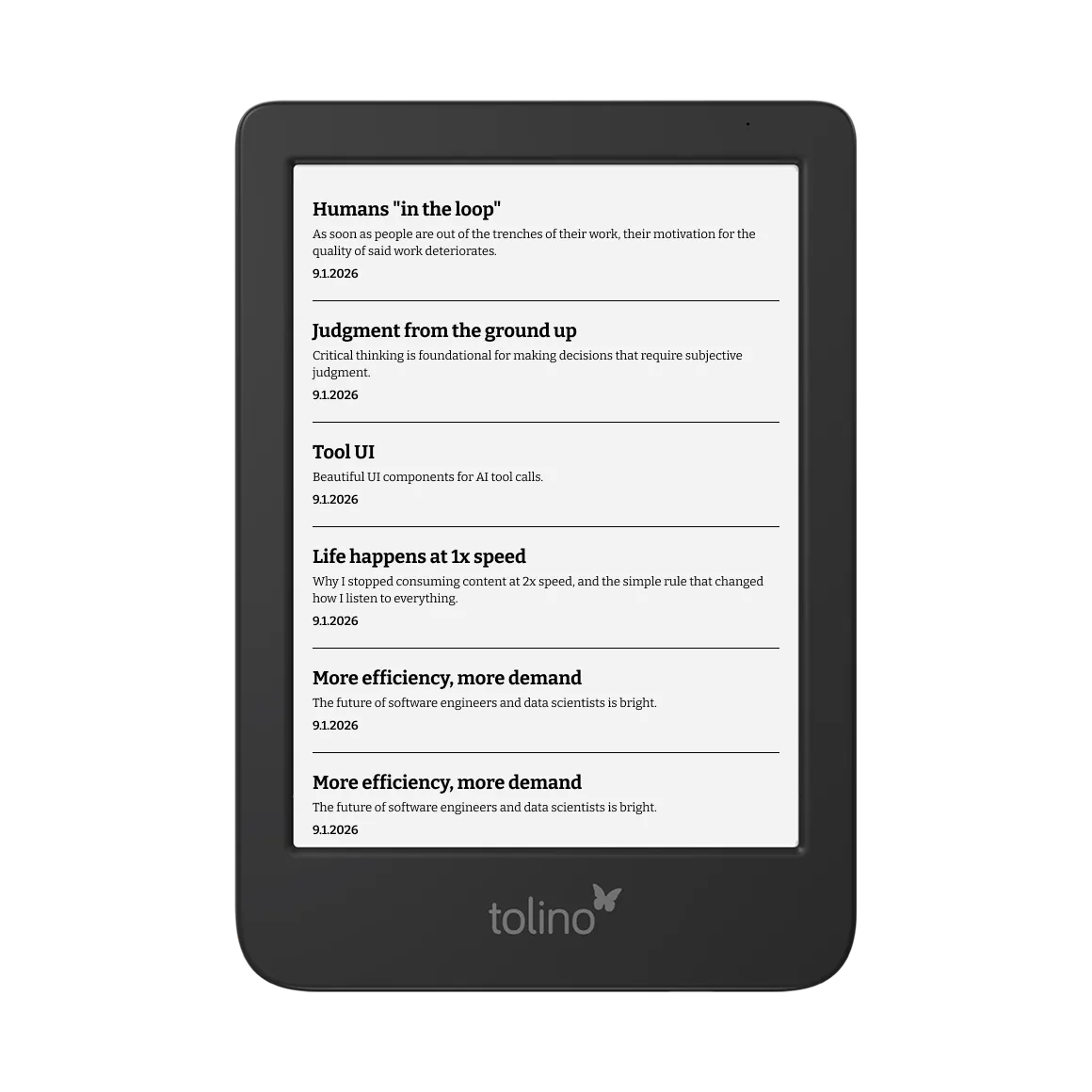
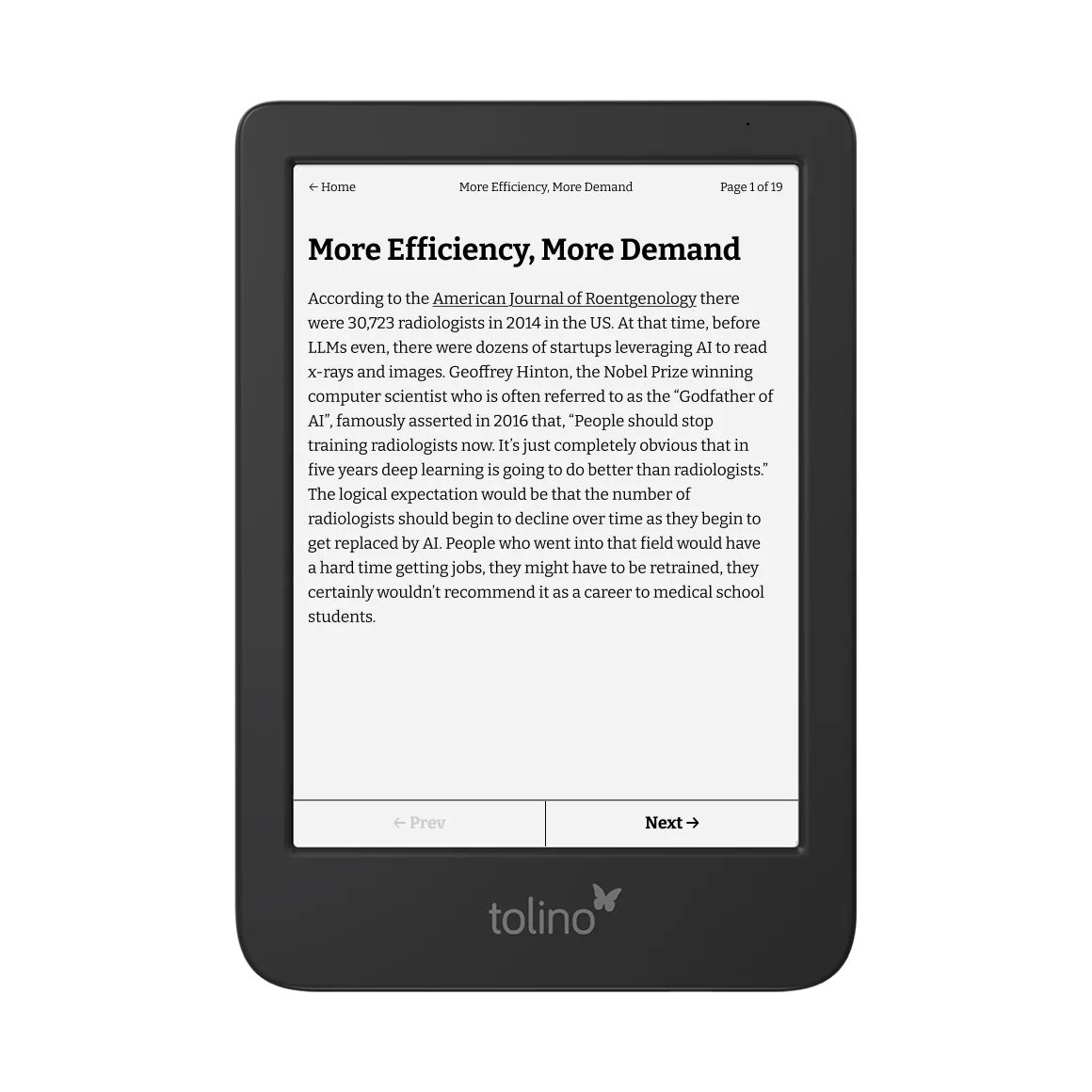
The UI is simplistic. A list of links on the frontpage. Only a few navigation elements on the reader view. Unfortunately, every click (tap) forces a repaint, causing the screen to flicker. And there is nothing you can do about it. So it was important to have as few clicks and scrolling interactions as possible. Thus pagination is the way to go. But instead of having a vertical pagination like Reabble I wanted it to look more book-like.
While Reabble uses a client-side logic for measuring text lengths, I went for a server-side chunking logic for now. This is more lightweight and requires fewer resources from the device. The downside is a bit less accuracy. So I might still have to scroll here and there.
The core of the system is an Astro SSR (Server-Side Rendering) route that transforms an URL into a paginated E-book experience. Using @mozilla/readability and linkedom, I extract the primary article content. dompurify then strips all inline styles, classes, and layout-breaking elements (scripts, iframes), creating a clean, “naked” HTML structure. Since the server cannot “paint” the pixels to see where they land, I use a scoring loop to estimate vertical height. Each HTML node is assigned a “weight” based on word count and rough element size. Once the cumulative score exceeds a calculated threshold (tuned to the device’s specific browser chrome and screen height), the engine “breaks” the content into a new array element, effectively creating a virtual page.
The CSS
It’s no surprise that there are not that many projects out there that deal with E-ink-specific CSS. ePaper CSS from Marco Mattes is one of them. The rules are quite simple: stick to black and white, disable animations, avoid scrolling whenever possible. Given the purpose of my application I also stripped out images to not waste screen real estate. The Tolino browser can utilize the pre-installed fonts on the device, so going for one of them is the way to go. I chose Bitter for its perfect readability. For other devices like Kobos, https://nicoverbruggen.be/fonts provides a great overview of fonts that have been altered specifically for E-ink screens.
Conclusion
The goal of this project was to explore what it means to use AI to build (‘vibecode’) something you personally need and would use – I recommend Lee Robinson’s thoughts on this here. It was interesting to see how quickly you can come up with a working prototype from which you can iterate and optimize the details. For my personal use case the app works well although it’s far from perfect. I’m fully aware that there would be more capable devices (Boox, Remarkable, Daylight Computer etc.) that come with a better browser and also allow for custom apps to be installed. For now, I’m quite happy with the result.